
Get alerts when purchase order lines change on invoiced jobs
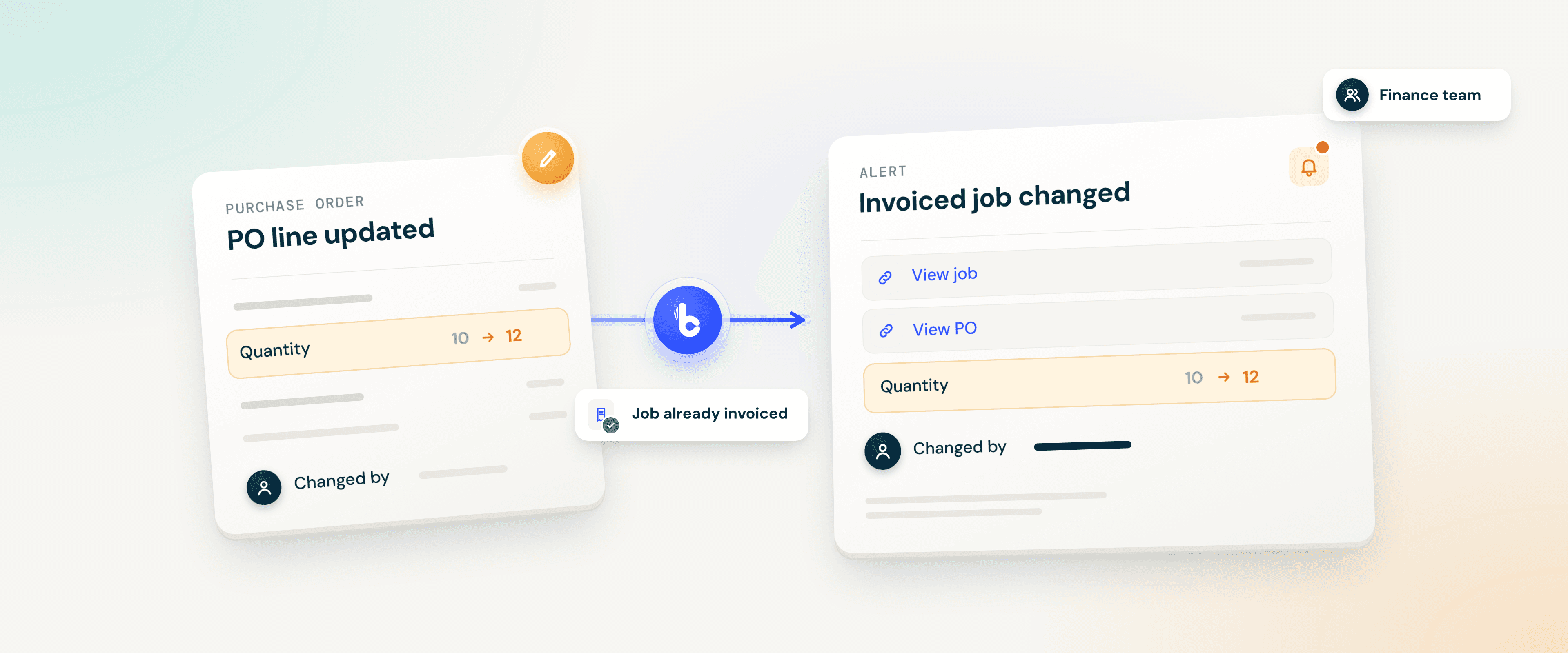
When someone updates a purchase order (PO) line, Build Concierge checks whether the job it belongs to has already been invoiced. If it has, the people you choose receive an alert showing what changed, who changed it and links to the job and the PO. Your team can review the change while it's recent, rather than coming across it at month-end.


The problem: changes nobody hears about
Finance is closing the month and a job's costs look different from when it was invoiced. Somewhere along the way, a PO line was edited. The change may well be legitimate, but nobody who looks after that job's figures was told.
Now someone has to trace the edit back through the system and ask around for the reason, weeks after it happened.
How it works
- A PO line is updated. Your job management system notifies Build Concierge when a change to a PO line is saved.
- The job is checked. Build Concierge finds the PO and the job it belongs to, and checks whether that job has already been invoiced. If it hasn't, no alert is sent.
- The details are gathered. For an invoiced job, it collects the line details and the line's change history, including which fields were edited and who made the change.
- Your team is alerted. The alert goes to the people you've chosen.
Each alert shows:
- the job and PO references, with links to both
- the line description, quantity and value excluding VAT
- the nominal code and delivery status
- the fields that were edited, such as quantity, price, discount or tax code
- who made the change, and the line's available change history
The automation only informs people. It doesn't block the edit or change the invoice, the job or the PO. Your team decides what, if anything, needs to happen next.
Illustrative example
A job is invoiced on Tuesday. On Thursday, someone increases the quantity on one of its PO lines from 10 to 12. Your finance team receives an alert with links to the job and the PO, the line details, the change from 10 to 12 and the name of the person who made it. They check with the buyer and agree the next step.
What it covers
Invoiced jobs only. Edits to lines on jobs that haven't been invoiced yet don't trigger an alert, so routine changes on live work stay out of your inbox.
The jobs you care about. Watch every invoiced job, or only the job types you choose.
The people who need to know. Send alerts to your finance team, an operations lead or a shared inbox. If you'd like alerts in another tool your team uses, discuss the options with your Customer Solutions team.
Getting set up
You'll need a job management system that can notify Build Concierge when a PO line is updated, and API access so Build Concierge can read the job, the PO and the line's change history.
- Review your system. Your Customer Solutions team checks how your job management system records PO changes.
- Connect your job management system. Your API details are stored securely in Build Concierge.
- Choose recipients and job types. Decide who receives alerts and which jobs to watch.
- Test, then go live. We update a test line on an invoiced job, check the alert, then switch it on.
Worth knowing
No. Many changes after invoicing are perfectly valid, such as a corrected price or a confirmed delivery quantity. The alert makes sure the right person knows, so they can decide whether any action is needed.
Already using Build Concierge? Your Customer Solutions team can set this up on your system.
More from the knowledge centre
Answer out-of-hours calls & alert the on-call engineer automatically
When an emergency call comes in overnight, Concierge Receptionist answers it, captures the details and raises the job. The on-call engineer is then called, texted or both, with everything they need to set off.

Automatically keep company records up to date in your systems
Build Concierge uses your Handshaik account to fill in missing company details for customers and prospects, including registered addresses and company numbers. It can also add figures from their latest filed accounts. Your team has the information to hand in your existing systems, without having to look it up manually.

Turn SOR codes on job cards into priced invoice lines automatically
Your engineers record the schedule of rates (SOR) codes they used. Build Concierge adds each one to the job as a priced line from your own price list and raises the invoice, ready for your team.

Check every job card against its charges before invoicing
Build Concierge reads each completed job card, compares the materials used with the job's charges, and flags any gaps before the invoice goes out.

Catch certificate errors while the visit is still fresh
When an engineer submits a completed job card, Build Concierge checks the certificate details against the rules you've agreed for that type of work. It records the findings on the job and tells your team what needs a closer look.

Turn emailed hire requests into hire contracts automatically
When a customer emails your hire desk, Build Concierge reads the request and any attachments. It then matches the customer, delivery site and equipment, and creates a hire contract in your hire management system. Your hire desk checks and confirms the contract instead of keying it in from scratch. Requests it can't match with confidence come to your team instead.

Answer out-of-hours calls & alert the on-call engineer automatically
When an emergency call comes in overnight, Concierge Receptionist answers it, captures the details and raises the job. The on-call engineer is then called, texted or both, with everything they need to set off.
Automatically keep company records up to date in your systems
Build Concierge uses your Handshaik account to fill in missing company details for customers and prospects, including registered addresses and company numbers. It can also add figures from their latest filed accounts. Your team has the information to hand in your existing systems, without having to look it up manually.
Turn SOR codes on job cards into priced invoice lines automatically
Your engineers record the schedule of rates (SOR) codes they used. Build Concierge adds each one to the job as a priced line from your own price list and raises the invoice, ready for your team.
Check every job card against its charges before invoicing
Build Concierge reads each completed job card, compares the materials used with the job's charges, and flags any gaps before the invoice goes out.
Catch certificate errors while the visit is still fresh
When an engineer submits a completed job card, Build Concierge checks the certificate details against the rules you've agreed for that type of work. It records the findings on the job and tells your team what needs a closer look.
Turn emailed hire requests into hire contracts automatically
When a customer emails your hire desk, Build Concierge reads the request and any attachments. It then matches the customer, delivery site and equipment, and creates a hire contract in your hire management system. Your hire desk checks and confirms the contract instead of keying it in from scratch. Requests it can't match with confidence come to your team instead.
Answer out-of-hours calls & alert the on-call engineer automatically
When an emergency call comes in overnight, Concierge Receptionist answers it, captures the details and raises the job. The on-call engineer is then called, texted or both, with everything they need to set off.
Automatically keep company records up to date in your systems
Build Concierge uses your Handshaik account to fill in missing company details for customers and prospects, including registered addresses and company numbers. It can also add figures from their latest filed accounts. Your team has the information to hand in your existing systems, without having to look it up manually.
Turn SOR codes on job cards into priced invoice lines automatically
Your engineers record the schedule of rates (SOR) codes they used. Build Concierge adds each one to the job as a priced line from your own price list and raises the invoice, ready for your team.
Check every job card against its charges before invoicing
Build Concierge reads each completed job card, compares the materials used with the job's charges, and flags any gaps before the invoice goes out.
Catch certificate errors while the visit is still fresh
When an engineer submits a completed job card, Build Concierge checks the certificate details against the rules you've agreed for that type of work. It records the findings on the job and tells your team what needs a closer look.
Turn emailed hire requests into hire contracts automatically
When a customer emails your hire desk, Build Concierge reads the request and any attachments. It then matches the customer, delivery site and equipment, and creates a hire contract in your hire management system. Your hire desk checks and confirms the contract instead of keying it in from scratch. Requests it can't match with confidence come to your team instead.