
Automatically record SLA breaches against the right job stage
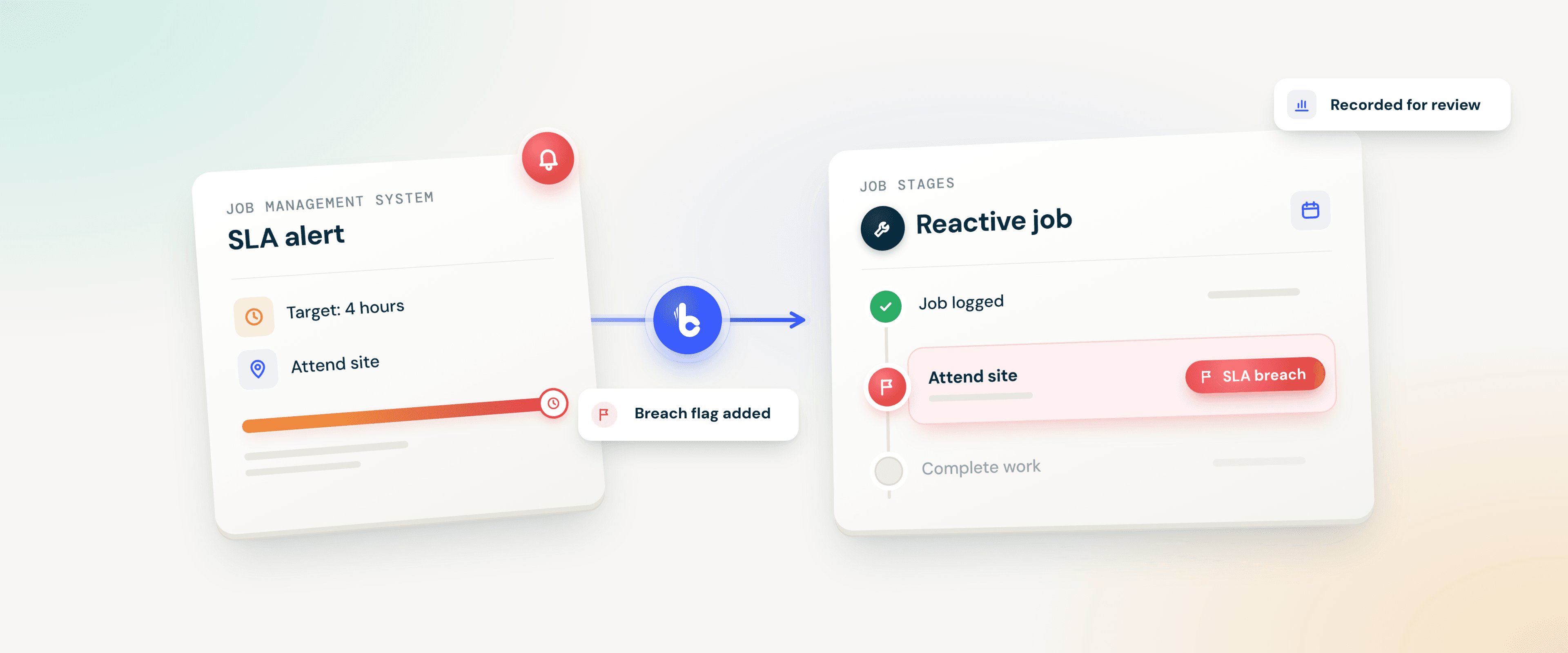
A service-level agreement (SLA) sets how quickly each stage of a job should happen, such as attending site or completing the work. When your job management system raises an SLA alert because a stage has run past its agreed time, Build Concierge finds that stage and flags it as a breach. The breach sits on the job, where your team can follow it up and report on it, rather than in an inbox.


The problem: breaches nobody can count
SLA alerts land in a shared inbox alongside everything else. Some get actioned, some get missed, and none are recorded against the job. At month-end, someone works back through timestamps to calculate response times by hand.
Then the client's monthly report arrives, and the performance conversation starts from their numbers rather than yours.
How it works
Your job management system decides when a stage has breached. Build Concierge records the breach.
- Your system raises the alert. Your job management system identifies that a stage has passed its agreed time and sends an SLA alert to your Build Concierge inbox.
- Build Concierge finds the stage. It reads the reference in the alert to identify the exact stage it relates to.
- The breach is flagged. That stage is given your SLA breach flag in the job management system. The job's dates and status are not changed.
- Exceptions come to a person. If the stage can't be identified or the flag can't be added, an email goes to your chosen contact with the reference and the reason, so someone can check it and add the flag by hand.
Illustrative example
A reactive job has a four-hour attendance target. Four hours pass without attendance, and your job management system sends its SLA alert. Build Concierge flags the attendance stage as a breach on that job. Your helpdesk sees the flag and contacts the engineer and the client, and the breach is already recorded for the month-end review.
What it covers
Coverage follows your alerts. Breaches are flagged for the stages your job management system sends SLA alerts for. A stage without an alert won't be flagged, so set alerts for the stages each contract measures.
One consistent flag. Every breach carries the same flag, so you can use your job management system's existing filters and reports to pull breaches together for a client review.
Recording, not monitoring. Build Concierge doesn't track deadlines itself or prevent breaches. It records the breaches your system alerts on, and tells a person when it can't.
Getting set up
You'll need a job management system that sends SLA alerts by email, an SLA breach flag set up in that system, and API access so Build Concierge can add the flag.
- Review your alerts. Your Concierge Support team looks at the SLA alerts your system sends today and the stages they cover.
- Agree the flag. We use an existing SLA breach flag, or help you set one up.
- Connect and route. We connect your job management system and your SLA alerts are sent or forwarded to your Build Concierge inbox.
- Choose your contact. Decide who receives the email when a breach can't be flagged automatically.
- Test, then go live. We run a test alert, check the flag appears on the right stage, then switch it on.
Worth knowing
A breach is when a job stage, such as attending site or completing the work, takes longer than the time agreed with the client in the service-level agreement.
Yes, as long as your job management system sends an SLA alert for that stage.
Recording every breach against the job and stage gives you your own record to compare with the client's report, instead of relying on theirs.
Yes. Talk to your Concierge Support team about adding SLA alerts for further stages and routing them to Build Concierge.
No. Your agreed times and alert settings stay in your job management system, exactly as you've set them.
Existing customers can speak to their Concierge Support team about running this on their SLA alerts.
More from the knowledge centre
Answer out-of-hours calls & alert the on-call engineer automatically
When an emergency call comes in overnight, Concierge Receptionist answers it, captures the details and raises the job. The on-call engineer is then called, texted or both, with everything they need to set off.

Automatically keep company records up to date in your systems
Build Concierge uses your Handshaik account to fill in missing company details for customers and prospects, including registered addresses and company numbers. It can also add figures from their latest filed accounts. Your team has the information to hand in your existing systems, without having to look it up manually.

Turn SOR codes on job cards into priced invoice lines automatically
Your engineers record the schedule of rates (SOR) codes they used. Build Concierge adds each one to the job as a priced line from your own price list and raises the invoice, ready for your team.

Check every job card against its charges before invoicing
Build Concierge reads each completed job card, compares the materials used with the job's charges, and flags any gaps before the invoice goes out.

Catch certificate errors while the visit is still fresh
When an engineer submits a completed job card, Build Concierge checks the certificate details against the rules you've agreed for that type of work. It records the findings on the job and tells your team what needs a closer look.

Get alerts when purchase order lines change on invoiced jobs
When someone updates a purchase order (PO) line, Build Concierge checks whether the job it belongs to has already been invoiced. If it has, the people you choose receive an alert showing what changed, who changed it and links to the job and the PO. Your team can review the change while it's recent, rather than coming across it at month-end.

Answer out-of-hours calls & alert the on-call engineer automatically
When an emergency call comes in overnight, Concierge Receptionist answers it, captures the details and raises the job. The on-call engineer is then called, texted or both, with everything they need to set off.
Automatically keep company records up to date in your systems
Build Concierge uses your Handshaik account to fill in missing company details for customers and prospects, including registered addresses and company numbers. It can also add figures from their latest filed accounts. Your team has the information to hand in your existing systems, without having to look it up manually.
Turn SOR codes on job cards into priced invoice lines automatically
Your engineers record the schedule of rates (SOR) codes they used. Build Concierge adds each one to the job as a priced line from your own price list and raises the invoice, ready for your team.
Check every job card against its charges before invoicing
Build Concierge reads each completed job card, compares the materials used with the job's charges, and flags any gaps before the invoice goes out.
Catch certificate errors while the visit is still fresh
When an engineer submits a completed job card, Build Concierge checks the certificate details against the rules you've agreed for that type of work. It records the findings on the job and tells your team what needs a closer look.
Get alerts when purchase order lines change on invoiced jobs
When someone updates a purchase order (PO) line, Build Concierge checks whether the job it belongs to has already been invoiced. If it has, the people you choose receive an alert showing what changed, who changed it and links to the job and the PO. Your team can review the change while it's recent, rather than coming across it at month-end.
Answer out-of-hours calls & alert the on-call engineer automatically
When an emergency call comes in overnight, Concierge Receptionist answers it, captures the details and raises the job. The on-call engineer is then called, texted or both, with everything they need to set off.
Automatically keep company records up to date in your systems
Build Concierge uses your Handshaik account to fill in missing company details for customers and prospects, including registered addresses and company numbers. It can also add figures from their latest filed accounts. Your team has the information to hand in your existing systems, without having to look it up manually.
Turn SOR codes on job cards into priced invoice lines automatically
Your engineers record the schedule of rates (SOR) codes they used. Build Concierge adds each one to the job as a priced line from your own price list and raises the invoice, ready for your team.
Check every job card against its charges before invoicing
Build Concierge reads each completed job card, compares the materials used with the job's charges, and flags any gaps before the invoice goes out.
Catch certificate errors while the visit is still fresh
When an engineer submits a completed job card, Build Concierge checks the certificate details against the rules you've agreed for that type of work. It records the findings on the job and tells your team what needs a closer look.
Get alerts when purchase order lines change on invoiced jobs
When someone updates a purchase order (PO) line, Build Concierge checks whether the job it belongs to has already been invoiced. If it has, the people you choose receive an alert showing what changed, who changed it and links to the job and the PO. Your team can review the change while it's recent, rather than coming across it at month-end.